Showing posts with label Social Networking. Show all posts

Update Your Facebook Status With Twitter

Monday, December 7, 2009

0 comments
The other day I was asked by a friend how I update my Facebook status even if I'm offline. I just said I updated through my mobile. Well, that's half true. I actually set it up so my Facebook status is updated with every tweet I post. I have been using Twitter a lot longer than Facebook and it seemed logical that I should use Twitter status updates to likewise update my Facebook status. Good thing about it is I can update my Twitter status by sending a text message to @tweetitow (more on that in this blog post: Send Twitter Updates Thru SMS).

Here's how I set up Facebook to update with my Twitter updates...

1. Login to Facebook and use Search get to the Twitter application page. It's best to just use Search within Facebook, the URL changes from user to user so I won't link to it directly:

2. Once there, click on Go to Application:


3. Authorize the app by clicking the Allow button:


4. Key-in your Twitter details:

5. After that you'll be redirected to your personal page where you could tweet from within Facebook. Click on the Allow Twitter to Update Your Facebook Status button:

And you are all set. All your tweets will appear in your Facebook as status updates. Happy tweeting!

Send Twitter Updates Thru SMS

Sunday, December 6, 2009

2 comments
Updating Twitter using my mobile used to be expensive. Since I am in the Philippines, I was limited to sending international SMS to Twitter's UK number. But then I discovered phTwitters. Then it stopped working. It was free after all and nobody was required to pay anything for it. I'm not really sure if they stopped because they didn't have enough resources to sustain operations. No matter, though. I found @tweetitow.

With @tweetitow, I simply send a text message to their number and it gets posted on my Twitter page. The major plus to using it is it's free, aside that is from the cost of sending a regular text message that is.

Here's how to sign up and use it:

1. Register by sending an SMS to any of the following numbers (really useful if you have unlimited texting, there's a number for each carrier):
  • Globe: 0927-338-9183
  • Smart: 0928-102-0579
  • Sun: 0923-986-0673
2. Use the following format (without the quotes): 'REG username password'
3. You'll get a text confirmation from a different number.
4. Reply to that number to have your status updated.

There, you should be all set then. Be sure to drop by this Tweetitow's FAQ's to make the most out of service. If you're new to Twitter, drop by the Twitter Help page to learn more about how it works.

If you enjoy the convenience of using @tweetitow, please consider donating load to them to keep operations running. They don't charge anything so they need help maintaining the costs for cellphone numbers used in the service. As much as possible, please send call cards instead of e-load or autoload. They will be able to use call card load a lot longer than the electronic kind that expires in a matter of days. Just send a Direct Message to @tweetitow for details on how you can send your valuable donations to keep the Filipino tweeters tweeting from their mobiles :-)

Happy tweeting!

Pinoy Artists Sing for Awareness on Climate Change

Wednesday, December 2, 2009

0 comments
Just wanted to share this video.I know that I don't have that many readers but anyone who reads this and watches the video will be one more aware individual. Let's talk about this, act on it, spread the word:


The World Needs You!

Saturday, October 24, 2009

1 comments
Helping curb climate change can be a daunting task. The contribution of one person may seem an insignificant, but not if we come together to commit to making things change.


To know more, follow 350.0rg in Twitter or become a fan in Facebook

Ever Wonder What Happens in TechSupport?

Thursday, October 8, 2009

0 comments
Here's a funny look at tech support, how things are supposedly done behind the scenes - LOL. For people working tech support, please don't take this offensively. It's just a comic after all.


For more funny and geeky comics, go to http://xkcd.com/

HowTo: Update Facebook Status via SMS (cheap) - II

Wednesday, May 13, 2009

2 comments
Someone tipped me off that Globe also has an app on Facebok similar to PixMe! for updating FB content. It's called UPD8. Here's how to sign up and start using it.

1. While logged on to your FB account, do a search for UPD8. When you get to to this page, click on Go To Application to start setting it up:

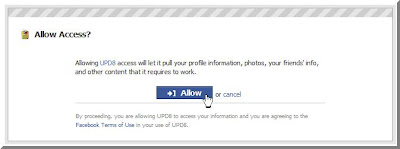
2. Click on Allow to grant the application access tyo your FB information:

3. UPD8 will ask you ro register a specific Globe mobile number. Key in your number and click Register:

4. Confirm the registration by clicking on OK in the window that pops up:
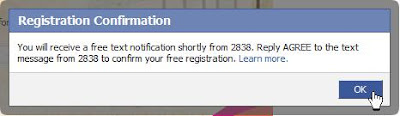
5. You'll receive a confirmation text message from 2838 that says, "Welcome to UPD8! To confirm registration, reply AGREE for free." Simply reply to that message with the word "AGREE".

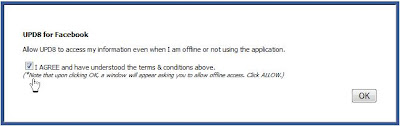
6. After you reply with the word "AGREE" to 2838, you'll get a confirmation text on your mobile and a confirmation message inside of FB. Click on the agree check box and hit the OK button:
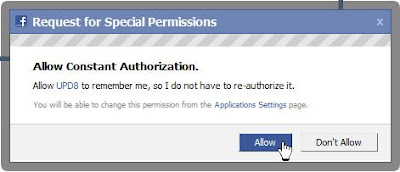
7. Another permission window will appear. Just click Allow to give FB permission to use the app:

8. After that you'll be directed to the main UPD8 app menus and they look like this:


9. Since you're new and signing up, if you click on Status Updates it will show an agreement. You will have to click on the Agree check box to accept to the 2.50 per update charge. This will allow you to use the service. After that click on OK:
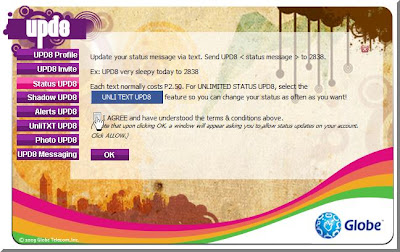
10. Another permissions window appears to allow the app to do status updates for you (just hit okay in the succeeding window):
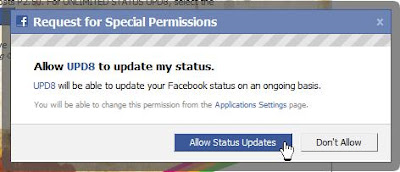
11. A confirmation that the process has been complete will appear in the main UPD8 page:
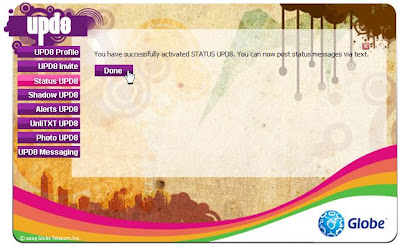

Now all you need to do is to send a message to 2838 using the syntax UPD8 *status*. Each update will cost you 2.50, although heavy users can go unlimited for 15 pesos a day. You can activate that by sending UNLI15 to 2838. If you're really, really must update it everyday and you update your status every hour, I'd recommend going unlimited for 5 days. That'll cost you 50 pesos, though if you push a lot of update it'd be worth it. Send UNLI50 to 2838 to get unlimited FB status updates for 5 days.

I must say that UPD8 has more features than PixMe does. I'm anxious to try all of them out, but that'll have to wait until i can get a proper phone for my second SIM.

HowTo: Update Facebook Status via SMS (cheap)

Saturday, May 9, 2009

1 comments
If you're a Facebook user and you'd like to update your status from your mobile, the usual way to go about it would be to confirm your number with Facebook and send pics and updates through MMS. Now if you're an avid FB user and you're in the Philippines the cost would snowball in a matter of days. I found a way to send updates and pictures to Facebook for 1 peso per update, though you'd have to be a Smart subscriber to do this. You can use a Facebook app called PixMe! Here's a quick guide on how to start using it:

1. Log in to your FB account, search for PixMe! then from this page click Go to the Application:

2. Click on Register in this screen to start the validation process:

3. You'll be asked to enter your Smart mobile number. Key in your phone number and click Register:


3. A window will pop-up to ask for permission. Click on Allow to authorize the PixMe app (click OK on the succeeding window that pops up):

4. You'll receive an SMS with this message:"Facebook notification msg: To validate ur cellnumber, txt FBVAL 123abc to 2330. If u r not XXnameXX, ignore this msg. This msg is free", where 123abc is the validation code and XXnameXX is your FB username.

5. Send a reply, following the syntax and the validation code in the message.

6. You will receive a confirmation message that the validation was successful.

7. Go back to the last PixMe! page you landed on after step 3 and click on the link to allow status updates:

8. You'll be asked to give permission again (click OK on the succeeding window):

9. You can now update your FB status by sending a messages to 2330. Use this command: FBSTATUS XXmessageXX (where XXmessageXX is the text of the status update you want to send). Each message is charged P1.00 .

There you have it. Enjoy updating your FB on the go.


UPDATE: Uploaded bigger versions of the screenshots to make them easier to recognize. Hope it helps
Free Ground Shipping on Orders $125 or more at EpsonStore
Stop PC Crashes with WinZip System Utilities

Copyright © 2011 Tech Throes | Splashy Free Blogger Templates with Background Images, Trucks