Hmmm... With a title like Distinguished Engineer, teh geek has bragging rights!
What's New in 2009.06?
Wednesday, September 23, 2009
0 commentsHmmm... With a title like Distinguished Engineer, teh geek has bragging rights!


ZFS Vid -
Saturday, May 16, 2009
0 commentsFound this while looking online for stuff about Open Solaris. I'm actually eager to try tyhe next version coming out in about 2 months. The ZFS concept interests me. If this thing is as good as they say it is, then it should become the journaled file system of the future. Open Source FTW!
HowTo: Update Facebook Status via SMS (cheap) - II
Wednesday, May 13, 2009
2 comments
Someone tipped me off that Globe also has an app on Facebok similar to PixMe! for updating FB content. It's called UPD8. Here's how to sign up and start using it.
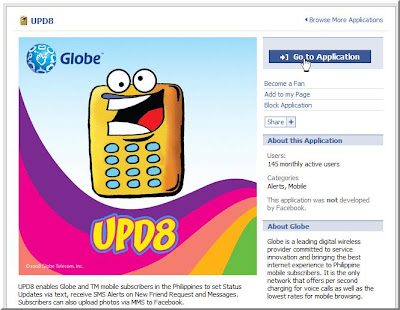
1. While logged on to your FB account, do a search for UPD8. When you get to to this page, click on Go To Application to start setting it up:
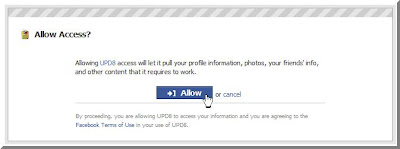
2. Click on Allow to grant the application access tyo your FB information:
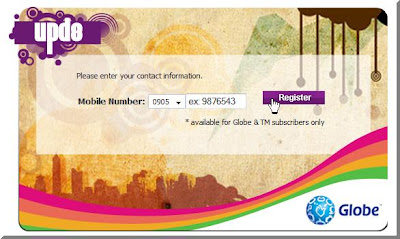
3. UPD8 will ask you ro register a specific Globe mobile number. Key in your number and click Register:
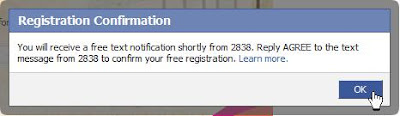
4. Confirm the registration by clicking on OK in the window that pops up:
 5. You'll receive a confirmation text message from 2838 that says, "Welcome to UPD8! To confirm registration, reply AGREE for free." Simply reply to that message with the word "AGREE".
6. After you reply with the word "AGREE" to 2838, you'll get a confirmation text on your mobile and a confirmation message inside of FB. Click on the agree check box and hit the OK button:
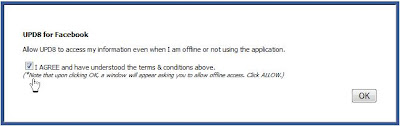 7. Another permission window will appear. Just click Allow to give FB permission to use the app:
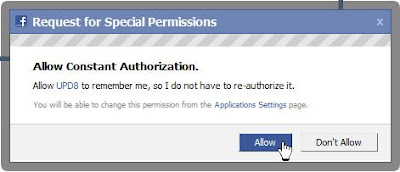
8. After that you'll be directed to the main UPD8 app menus and they look like this:
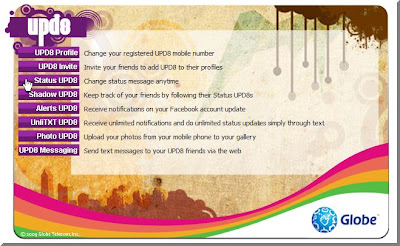
9. Since you're new and signing up, if you click on Status Updates it will show an agreement. You will have to click on the Agree check box to accept to the 2.50 per update charge. This will allow you to use the service. After that click on OK:
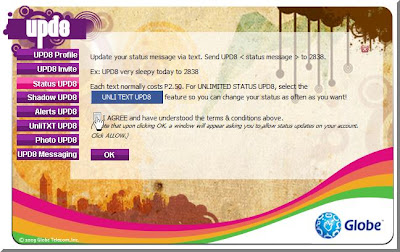
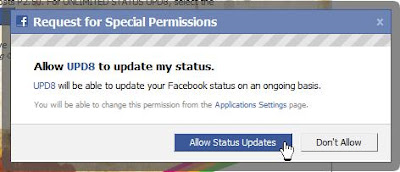
10. Another permissions window appears to allow the app to do status updates for you (just hit okay in the succeeding window):
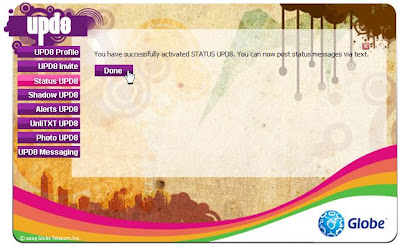
11. A confirmation that the process has been complete will appear in the main UPD8 page:
Now all you need to do is to send a message to 2838 using the syntax UPD8 *status*. Each update will cost you 2.50, although heavy users can go unlimited for 15 pesos a day. You can activate that by sending UNLI15 to 2838. If you're really, really must update it everyday and you update your status every hour, I'd recommend going unlimited for 5 days. That'll cost you 50 pesos, though if you push a lot of update it'd be worth it. Send UNLI50 to 2838 to get unlimited FB status updates for 5 days.
I must say that UPD8 has more features than PixMe does. I'm anxious to try all of them out, but that'll have to wait until i can get a proper phone for my second SIM.
1. While logged on to your FB account, do a search for UPD8. When you get to to this page, click on Go To Application to start setting it up:

2. Click on Allow to grant the application access tyo your FB information:

3. UPD8 will ask you ro register a specific Globe mobile number. Key in your number and click Register:

4. Confirm the registration by clicking on OK in the window that pops up:
 5. You'll receive a confirmation text message from 2838 that says, "Welcome to UPD8! To confirm registration, reply AGREE for free." Simply reply to that message with the word "AGREE".
6. After you reply with the word "AGREE" to 2838, you'll get a confirmation text on your mobile and a confirmation message inside of FB. Click on the agree check box and hit the OK button:
 7. Another permission window will appear. Just click Allow to give FB permission to use the app:
8. After that you'll be directed to the main UPD8 app menus and they look like this:

9. Since you're new and signing up, if you click on Status Updates it will show an agreement. You will have to click on the Agree check box to accept to the 2.50 per update charge. This will allow you to use the service. After that click on OK:

10. Another permissions window appears to allow the app to do status updates for you (just hit okay in the succeeding window):

11. A confirmation that the process has been complete will appear in the main UPD8 page:

Now all you need to do is to send a message to 2838 using the syntax UPD8 *status*. Each update will cost you 2.50, although heavy users can go unlimited for 15 pesos a day. You can activate that by sending UNLI15 to 2838. If you're really, really must update it everyday and you update your status every hour, I'd recommend going unlimited for 5 days. That'll cost you 50 pesos, though if you push a lot of update it'd be worth it. Send UNLI50 to 2838 to get unlimited FB status updates for 5 days.
I must say that UPD8 has more features than PixMe does. I'm anxious to try all of them out, but that'll have to wait until i can get a proper phone for my second SIM.
HowTo: Update Facebook Status via SMS (cheap)
Saturday, May 9, 2009
1 comments
If you're a Facebook user and you'd like to update your status from your mobile, the usual way to go about it would be to confirm your number with Facebook and send pics and updates through MMS. Now if you're an avid FB user and you're in the Philippines the cost would snowball in a matter of days. I found a way to send updates and pictures to Facebook for 1 peso per update, though you'd have to be a Smart subscriber to do this. You can use a Facebook app called PixMe! Here's a quick guide on how to start using it:
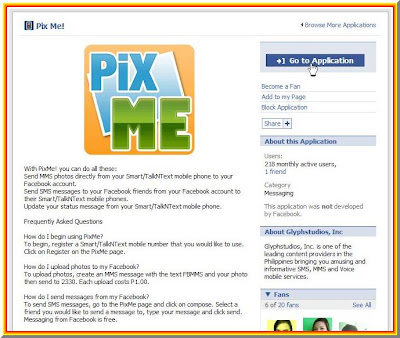
1. Log in to your FB account, search for PixMe! then from this page click Go to the Application:
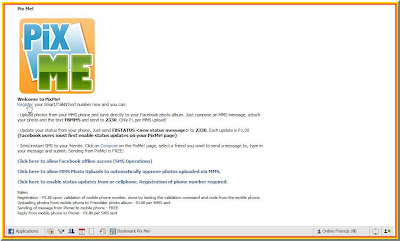
2. Click on Register in this screen to start the validation process:
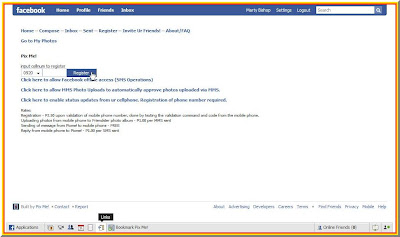
3. You'll be asked to enter your Smart mobile number. Key in your phone number and click Register:
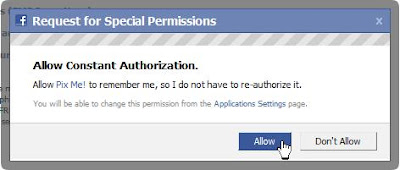
3. A window will pop-up to ask for permission. Click on Allow to authorize the PixMe app (click OK on the succeeding window that pops up):
4. You'll receive an SMS with this message:"Facebook notification msg: To validate ur cellnumber, txt FBVAL 123abc to 2330. If u r not XXnameXX, ignore this msg. This msg is free", where 123abc is the validation code and XXnameXX is your FB username.
5. Send a reply, following the syntax and the validation code in the message.
6. You will receive a confirmation message that the validation was successful.
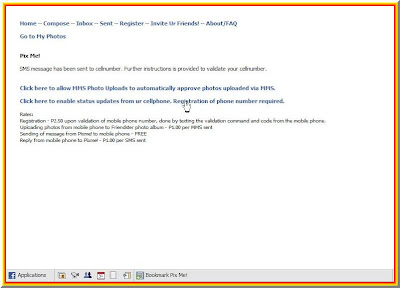
7. Go back to the last PixMe! page you landed on after step 3 and click on the link to allow status updates:
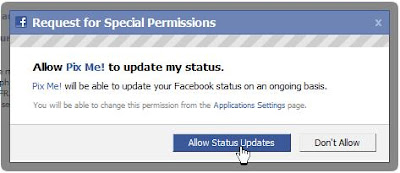
8. You'll be asked to give permission again (click OK on the succeeding window):
9. You can now update your FB status by sending a messages to 2330. Use this command: FBSTATUS XXmessageXX (where XXmessageXX is the text of the status update you want to send). Each message is charged P1.00 .
There you have it. Enjoy updating your FB on the go.
UPDATE: Uploaded bigger versions of the screenshots to make them easier to recognize. Hope it helps
1. Log in to your FB account, search for PixMe! then from this page click Go to the Application:

2. Click on Register in this screen to start the validation process:

3. You'll be asked to enter your Smart mobile number. Key in your phone number and click Register:

3. A window will pop-up to ask for permission. Click on Allow to authorize the PixMe app (click OK on the succeeding window that pops up):

4. You'll receive an SMS with this message:"Facebook notification msg: To validate ur cellnumber, txt FBVAL 123abc to 2330. If u r not XXnameXX, ignore this msg. This msg is free", where 123abc is the validation code and XXnameXX is your FB username.
5. Send a reply, following the syntax and the validation code in the message.
6. You will receive a confirmation message that the validation was successful.
7. Go back to the last PixMe! page you landed on after step 3 and click on the link to allow status updates:

8. You'll be asked to give permission again (click OK on the succeeding window):

9. You can now update your FB status by sending a messages to 2330. Use this command: FBSTATUS XXmessageXX (where XXmessageXX is the text of the status update you want to send). Each message is charged P1.00 .
There you have it. Enjoy updating your FB on the go.
UPDATE: Uploaded bigger versions of the screenshots to make them easier to recognize. Hope it helps
Making The Most Out of My Aging PC
Sunday, February 8, 2009
0 comments
It's been a while since I last blogged. I haven't been getting enough time to do so. Mostly I update Twitter, but that's because I can easily access it through SMS. It's really trivial to just jot down an update, especially so when your limited to 140 characters.
Anyway, I was looking forward to an upgrade but I had to use the money for car repairs. So I just decided to extend the functionality of my current PC, until I save up what I need. I have an old XPS T500, just to give you an idea what I meant when I said "aging PC".
Since most of the things I do need updated hardware, I prudently bought what could improve its functionality, considering this is a 10-year old machine. Here's my very short list:
The USB ports on this machine hail back to the early days. It only has two USB 1.0 ports. Painfully slow, I knew I needed a boost eventually, I just had to find good enough reason. Enter the great season of Christmas and I got a hand-me-down iPod Video (Thank you, Auntie!!!). So now, I felt the pangs of having a slow USB connection hampering my transfer speeds. I got the PCI USB card primarily to speed up syncing the iPod. Second benefit is I could connect more devices on the same hi-speed interface now. I solved the dilemma of having to remove my USB Bluetooth Dongle when I need to connect another device. It was kind of odd though that the PCI card had 4 ports at the back and 1 additional port located on the side of the card. I found a use for the internal port. I connected the Bluetooth dongle and it's now inside the case :-) I also bought a recently-made card reader so I could transfer files to my wife's phone (the mini-card uses an MS Pro Duo adapter). It's always connected to the machine now.
As for the PCI SATA controlller card, I needed to buy a hard drive for extra storage. IDE HDD's are now becoming rare. Most HDD's are now SATA. Add to that the fact that my machine will choke on anything bigger that 120 GB's. The PCI Card allows me to use a bigger SATA Drive. The catch is that it would be difficult to install XP on it since it I would need to slipstream the SATA/RAID drivers into the installer before XP detects it. That doesn't matter to me right now. I have a working 80GB IDE HDD where I have the OS installed. What matters is the ability to use SATA to allow me the flexibility to use bigger drives and use current hardware on my aging machine. Heck the card even has an external port for connecting SATA devices. This card is what we call "sulit" in Filipino. My next buy would probably be a SATA DVD Writer ;-) How's that for an old machine?
I did buy a few other things from CDR-King, mostly for the iPod. But that's another blog post :-)
Anyway, I was looking forward to an upgrade but I had to use the money for car repairs. So I just decided to extend the functionality of my current PC, until I save up what I need. I have an old XPS T500, just to give you an idea what I meant when I said "aging PC".
Since most of the things I do need updated hardware, I prudently bought what could improve its functionality, considering this is a 10-year old machine. Here's my very short list:
- LAN Card - D-Link 10/100 Fast Ethernet Card, Php 300
- PCI USB card - CDR-King 4-port (+1) USB 2.1 expansion card, Php 200
- USB Card Reader - CDR-King Classic Multi-format card reader, Php 120
- PCI SATA Controller - CDR-King 2-port (+1) SATA controller card, Php 380
- SATA Hard Drive - Seagate 7200.9 Drive, Php 1,000 (used)
The USB ports on this machine hail back to the early days. It only has two USB 1.0 ports. Painfully slow, I knew I needed a boost eventually, I just had to find good enough reason. Enter the great season of Christmas and I got a hand-me-down iPod Video (Thank you, Auntie!!!). So now, I felt the pangs of having a slow USB connection hampering my transfer speeds. I got the PCI USB card primarily to speed up syncing the iPod. Second benefit is I could connect more devices on the same hi-speed interface now. I solved the dilemma of having to remove my USB Bluetooth Dongle when I need to connect another device. It was kind of odd though that the PCI card had 4 ports at the back and 1 additional port located on the side of the card. I found a use for the internal port. I connected the Bluetooth dongle and it's now inside the case :-) I also bought a recently-made card reader so I could transfer files to my wife's phone (the mini-card uses an MS Pro Duo adapter). It's always connected to the machine now.
As for the PCI SATA controlller card, I needed to buy a hard drive for extra storage. IDE HDD's are now becoming rare. Most HDD's are now SATA. Add to that the fact that my machine will choke on anything bigger that 120 GB's. The PCI Card allows me to use a bigger SATA Drive. The catch is that it would be difficult to install XP on it since it I would need to slipstream the SATA/RAID drivers into the installer before XP detects it. That doesn't matter to me right now. I have a working 80GB IDE HDD where I have the OS installed. What matters is the ability to use SATA to allow me the flexibility to use bigger drives and use current hardware on my aging machine. Heck the card even has an external port for connecting SATA devices. This card is what we call "sulit" in Filipino. My next buy would probably be a SATA DVD Writer ;-) How's that for an old machine?
I did buy a few other things from CDR-King, mostly for the iPod. But that's another blog post :-)
Subscribe to:
Posts (Atom)


 Posts
Posts


