Showing posts with label Open Source. Show all posts

Edit Grub2 Boot Options Easily on Ubuntu 11.04

Friday, June 17, 2011

2 comments
A few months back I shared my discovery about editing boot options in Grub2 and how there was a different way to edit the boot options on menu.lst safely. I blogged about that in this post: Missing Your menu.lst? You've Got Grub2!

Having re-installed Ubuntu recently, I wanted to document how to do it within a GUI environment with mouse-click ease. Well, not really. I mean, you do have to type in a few things to actually download the app you need to do the boot options editing for you. But, it is easy and it is inside the picture-pretty interface. No terminal commands are involved and there were no animals harmed during the making of this HowTo. So enough of the dry wit and let's get to it:

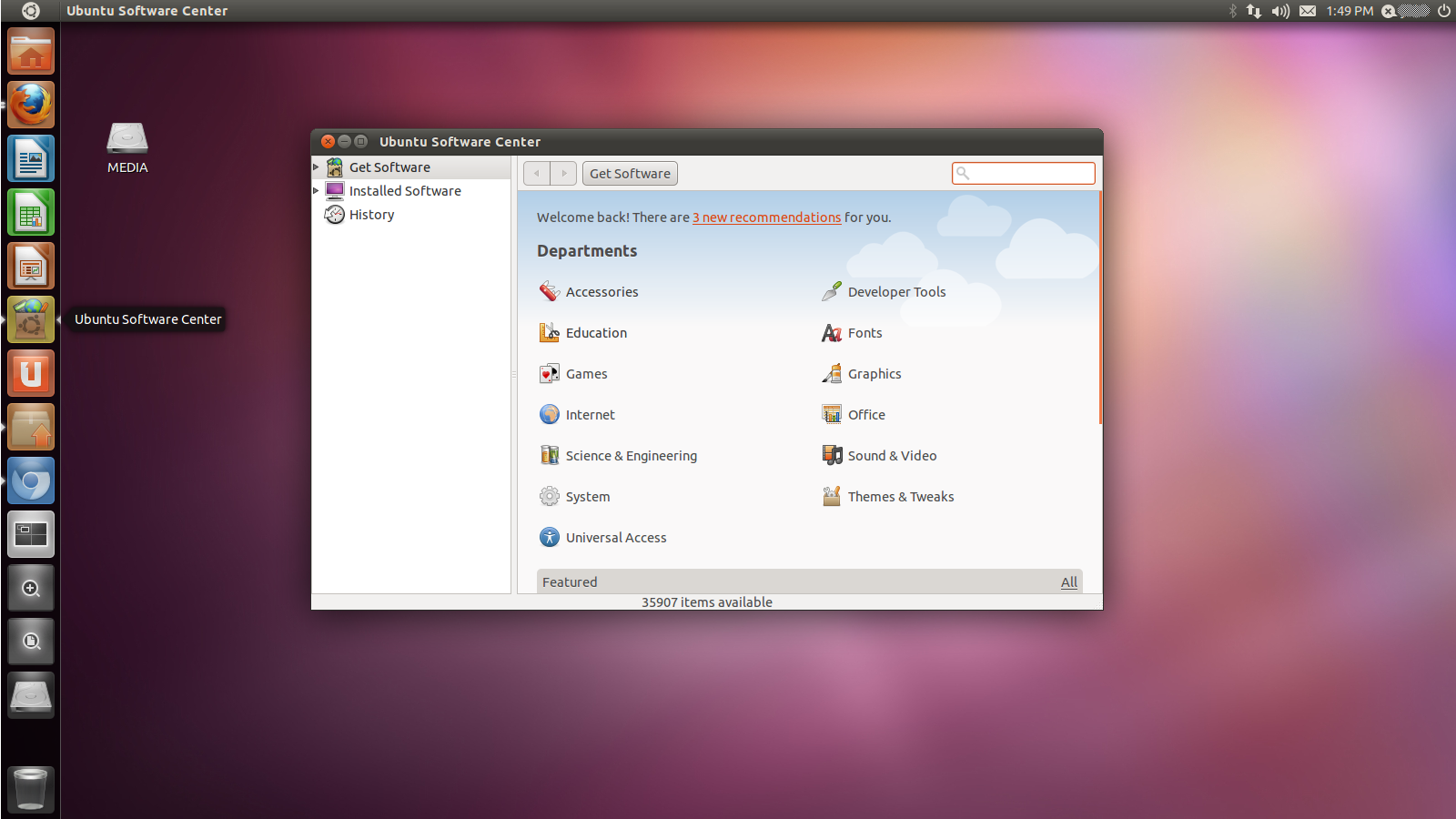
1. First, you need to download StartUp-Manager. The easiest way to do that is through the Ubuntu Software Center. You can click on the icon on the sidebar in Ubuntu 11.04:


2. Next, use the Search box in the Ubuntu Software Center to find the software you need. You can simply type in "StartUp" and Search will give you choices. StartUp-Manager is usually the first one:


3. Click on the entry for StartUp-Manager to select it. Once you click on the Install button, you'll be asked for your password:


4. Key in your password to authorize the install:


5. You'll be able to check on the progress of the download while it is running: 


6. After it is installed, where do you find it? Unlike previous versions on Ubuntu, where clicking on the Ubuntu logo will bring up a list of applications, 11.04 brings up a Search box instead of a huge list. I'm not a fan of it, but this may be easier for some people. Type in "Start" or "Startup" in Search and you should see StartUp-Manager listed first. Click on the icon to launch:


7. StartUp-Manager will perform a few tasks in the background, basically scan and create a list of items  you can configure for boot options:


8. Once StartUp-Manager is done polling the system for the information it needs, you can toggle the choices to your liking. In the sample below, I chose to shorten the Timeout to 5 from the original 10 seconds. I also chose to have Windows 7 as the Default Operating System. I'm not the only one using this PC, after all. And the wife prefers Windows 7 still. Everything else was pretty much left to the default values. After you're done, just click on the Close button:


9. StartUp-Manager will do the editing of boot options in the background:


10. Reboot and check to see if the options you set are to your liking. Just repeat the process of launching StartUp-Manager and clicking on different choices if you feel the need to change anything.

So much like everything Linux, there is a the terminal way of doing things and sooner-or-later an all-click, painless, graphical solution that some generous geek out there was kind enough to contribute to the community of users. Both methods are usually just as effective as the other. It's just nice to know that even in customizing your Linux install you are given choices. Choice matters for open-source and it's community of users are a great resource for giving every user in it that choice. Whether it be a way of doing things or different applications doing the same basic thing, there is choice. And that is where the crux of it all is!

Missing Your menu.lst? You've Got Grub2!

Tuesday, June 15, 2010

0 comments
If you're like me, you'd have been taking advantage of the popularity of Virtual Machine software to try out new Linux distributions. Or if you have a dual-boot (with Windows on one end and a Linux favorite on the other), you've been content at upgrading Linux from version to version without doing a full reinstall. Then there comes the confusion when doing a fresh install and you realize you don't know what that heck happened to the /boot/grub/menu.lst file on your Grub.

Since Ubuntu 9.10, Grub 2 has become the default boot loader. If you are looking for the menu.lst file that used to be what you edited to specify which OS to boot into by default, then I'm telling you it is gone. In Grub 2, the file that closely resembles its functionality is /boot/grub/grub.cfg, but that isn't supposed to be edited. You need to edit something else and then update grub.cfg. Here's how to do it in Ubuntu and Linux Mint, 2 of the distros I usually end up installing.

After installing Ubuntu or Mint and rebooting for the first time, take note of the menu entries. They usually follow the following pattern:

Ubuntu, linux *kernel_version_here*
Ubuntu, linux *kernel_version_here* (recovery mode)
Memory Test (memtest86+)
Memory Test (memtest86+, serial console mode)
Windows OS

Here's a sample of how it looks like on my desktop, Linux Mint as it were:


Now note that the default entry is "0", which points to the first option in the list above. That is to say your linux distro in normal mode is "0", your linux distro in recovery mode is "1" and so on. Counting from 0, Windows is then option 4 as listed above. Now as a sample, let's edit it so it boots to the Windows OS by default:

1. Open a terminal and type in "sudo gedit /etc/default/grub" (without the quotes). Type in your root password when asked:


2. Edit the entry GRUB_DEFAULT=0, replacing zero with the option you want to boot by default. In our sample way above, Windows is number 4:


3. Save the file and close it.

4. To update /boot/grub/grub.cfg with the new settings, go back to the terminal and enter the command “sudo update-grub” (without the quotes). Type in your root password if asked:


5. Reboot to test.

There you have it. Now if you'd want to go further and tweak the heck out of Grub2, you can go to the following links for very detailed instructions:

Ubuntu Grub2 Community Documentation - https://help.ubuntu.com/community/Grub2
Ubuntu Forums Grub2 Tweaks Thread - http://ubuntuforums.org/showthread.php?t=1287602
Ubuntu Forums Grub2 5 Common Tasks - http://ubuntuforums.org/showthread.php?t=1302743


Machine Revival - Part I

Tuesday, February 23, 2010

1 comments
Yesterday, I went out with my wife and bought a computer table. I had been planning to revive an old Dell Dimension XPS T500 I had laying around and repurposing it to be an all-around computer for the kids. My son has simple needs. He has great fun playing the games included in Child's Play and Gcompris. Well the wife and I ended up buying a cheap computer table from Saver's Mall in Balibago.

After I got home, I immediately started working on the machine. I installed an 80GB Maxtor IDE drive I bought used a few months back. I also removed a non-working network card, and stuck a more recent PCI LAN Card i had lying around in one of my desk drawers. I also installed a PCI USB card.  The  Dimension XPS T500 had slow USB 1.1 and the card would at least bring it up to USB 2.0 speeds. I then closed up the side panel and expected the thing to boot. But it didn't! Beeps ensued and the Diagnostic LED's on the machine's back lit up with a pattern. So I went to find an online manual, praying one was still online at all. This machine has a date stamp of November 1999 after all. 

As luck would have it I found one (if your interested, it's here: http://support.dell.com/support/edocs/systems/dkub/) . Following the clues as to what was going wrong, I reseated the video card and tried booting it. It booted up but the color on the display was yellowish. I reseated it again and powered it up once more. It beeped with a memory error. I unplugged the DIMMs, moved 'em to other slots and gave it a try. It POSTed! But then it was showing a PCI error. I forgot I left a PCI dial-up modem installed and decided to chuck it. The thing booted fine afterwards.

After I got it working I tried Fedora 12 Games, but it was just too slow to be usable. I was just hoping, but I knew the machine was too slow to use Fedora 12 Games. Anyway, I went off and tried another live distro, Linux Mint 8. This time it booted a lot more faster than Fedora, but it was still quite a good 8-10 minutes before I saw the desktop. I could just imagine my son jumping in anticipation only to get tired before the machine had fully booted. He's a little hyper over waiting time and jumps excitedly at times. While that was happening, I was waiting for my DreamLinux 3.5 download to finish. I've used DreamLinux 3.1 before on this same machine and it worked okay. And so I went with the reliable option and went ahead and installed  DreamLinux 3.5. After rebooting though, the machine wouldn't boot into it. It looked like the drive was having problems. So I tried disconnecting it and checking if the cables and connectors were okay, then booted it up again to try and install DreamLinux 3.5 again. Then I noticed the drive size was only 74.++ GB when it should be a little over 76 GB. Something wasn't right about the capacity. While thinking about it I decided to think it over. 

So today, after I got home and after thinking about it the whole day while at work, I gave the drive a go with DBAN. It's still running, actually. I don't expect it to finish any time soon. Maybe tomorrow morning. So I'll post an update if i get this to work. It would be a waste if I didn't get to play Tux Racer on this old machine now, would it?


GameFly - Black Anim

What's New in 2009.06?

Wednesday, September 23, 2009

0 comments


Hmmm... With a title like Distinguished Engineer, teh geek has bragging rights!

Install Ubuntu Within Windows Using Wubi

Thursday, May 8, 2008

0 comments
Shawn Powers just posted another video on how to install Linux within Windows without ever mucking around the hard drive partitions. Here's the video, enjoy:


OpenOffice.Org 3.0 Beta Released

Wednesday, May 7, 2008

0 comments
Great news! OpenOffice.Org 3.0 Beta was released today. The most notable (at least for me) are support for OpenDocument Format (ODF) version 1.2 and opening files created with MS-Office 2007 (or MS-Office 2008 if you're using the Mac OS X). There are tons of other improvements under the hood and you can you can check out the exhaustive list of new features from this page: http://marketing.openoffice.org/3.0/featurelistbeta.html.

They're inviting everyone to help test the beta. You can download it from this site: http://download.openoffice.org/3.0beta.

Ubuntu 8.04 Release Candidate is Out

Sunday, April 20, 2008

0 comments

I've eagerly anticipating the release of Hardy Heron, counting down the days these past two weeks. I've accumulated so much gunk in my hard-drive that I've needed to reinstall for some time now. I keep putting it off because I want to reinstall with Hardy Heron's final release on the 24th. I'm fighting off the temptation to go on and download the RC. I know it's just a simple "sudo apt-get-update" to get the final release in 5 days, but I prefer installing from the final release. I still can get over a bad install a few years back. I did an upgrade after installing the RC a few days before the release. I somehow broke the system during the upgrade. Besides, I want to see what's new in the install for myself. I've turned into someone who does enjoy the install process :-)

Linux is "Sexy, Smart and Cheap"

Wednesday, April 16, 2008

0 comments

Shawn Powers just posted a funny article on Linux Journal about his love affair with Linux. You can read him outline the reasons why he thinks Linux is sexy, smart and cheap from this article. Granted that he's a bit biased, but for the most part he's actually right. The whole affair of playing around with Linux is like falling in love with something. You can never get enough of it and the experience enriches you to no end, frustrations and triumphs included. One can never really describe it and can only understand it once one experiences it for real. Aye, love indeed! Give it a read. :-)

165 Linux Apps Running Simultaneously

0 comments
First there was the video about 100 apps running on Vista:


Then a screenshot of 150 apps running on a Mac.

Now we have 165 apps running on Linux (180, if you count the doubled-up windows):


Linux "pwns" them, hands down :-)

More on the HP 2133

Thursday, April 10, 2008

0 comments

Found 2 other articles on PCWorld about the HP 2133 Mini-Note.

Sumner Lemon spoke with Philip Devlin of HP about rife speculation that a future version of the HP 2133 would be fitted with the Via Isaiah processor. That would be relatively easy since the Via Isaiah is compatible with existing boards that support the C7-M.

Another article by Glenn Fleishman reviews the cost-vs-specs aspect of the unit. He compares it to other laptops straddling the UMPC demarcation line, pointing out that these are relatively under-powered when compared to ordinary laptops. But he conceeds that as trends go these days, buyers are willing to trade off processing heft for added portability.

Fleishman also links to a video review by Darren Gladstone that compares the HP 2133 head-to-head with the Asus Eee PC. Darren loves the keyboard, but hates how slow it is at running Vista Business. Well, good thing Suse Enterprise Desktop 10 is offered as an option to Vista Business ^_^ SLED 10 would run a lot better on the HP 2133. A whole lot better.

Mandriva 2008 Spring

Wednesday, April 9, 2008

0 comments
I just read the announcement that Mandriva released 2008 Spring (ver. 2008.1?). I was surprised to find a few interesting items in the list of things they've improved in this release. Notably they have now have parental controls, media server capabilities and better synchronization support with mobile devices built-in. Sadly Palm is not included in the list of devices that 2008 Spring provides "Easy support for synchronizing" for. Another noteworthy item is the out-of-the-box support for the Asus Eee PC. Mandriva touts that 2008 Spring "works perfectly on the Eee PC with no modifications" needed. I think I'll be busy during my offs trying out Mandriva and DreamLinux ^_^

By the way, you can check for screenshots of the beautifully designed desktops here: KDE, Gnome, Xfce. If your interested in trying out Mandriva 2008 Spring, you can download your free copy from here.

DreamLinux 3.1 Released

Saturday, April 5, 2008

0 comments
I received news that Dreamlinux released version 3.1 already. I'll be making time in the coming week to download and test this. The look of it is quite appealing, as evidenced by the screenshots in Distrowatch.com (here and here) and Dreamlinux' mainpage (here).

I really need to set-up VMWare server on my machine. That'll make it easier to test out new things without adding to the landfills unnecessarily (re: burning CD's). I'll see if I can make time this week, this personal mess hanging over me and all.

A Pragmatic Approach to Mobile Computing

Tuesday, March 11, 2008

0 comments
I have always been reluctant to call myself a geek. The popular definition sees geeks as technically adept people working in highly specialized fields. I would have less reluctance to call myself one given today's emerging definition of a geek. Geeks are people who are fans of a particular interest and they carry out their devotion with a passion. So I am a geek by that standard. I hold a particular interest in computer hardware, open source technology and volunteer work. I'm not particularly savvy at any of those fields of interest, but I talk about them with a fervor that can only be matched by street preacher.

One thing that particularly interests me is making technology work for the layman. Living in a country like the Philippines, most people do not have access to the latest in gadgetry or computer parts. I take a more pragmatic approach by making the most of what is available and focusing on cost versus utility. Let me draw a comparison. In the US, mobile computing would mean having a decently spec'd laptop with a powerful processor or a PDA-phone at the least. A broadband wireless connection is also necessary to keep you connected wherever you may roam. All three are available in the country today. However, the cost would be prohibitive save for executives and businessmen. It isn't really worth your money to spend that much when your budget or your needs don't justify it. So I tell friends they can have the same mobility for less.

With internet shops situated in just about any street or corner of the city, I find it much more cost effective to just carry a thumb drive. USB thumb drives go for around 700 to 900 pesos for one that can hold 4 gigabytes worth of files. To make it more useful, load it up with the open source software package called Portable Apps. Portable Apps comes with a browser, email client, IM client, office suite, anti-virus and a bevy of smaller apps that extend its usability. The advantage of Portable Apps is in the way it behaves. All the apps are self-contained and will work off the USB drive without the need to install it in the host machine. That means plug it in to any Windows machine and it'll run. When your done just pull it out and walk away. All your settings and files will be preserved on the drive. It beats having to lug around a 7-pound laptop any day.

The next cheapest option is already in your pocket - your phone. Think about it. You carry it around. You never leave home without it. You can connect to the internet with it. The challenge is choosing a phone that will let you do browse, email and IM. One of the cheapest options is the LG KU250 with a street price of around 6,000 pesos. It's a 3-G phone that can be quite usable if your willing to exert a little effort. Installing the Opera Mini browser will make viewing sites not optimized for phones easier. If you have a Google Mail (Gmail) account, you can download an app that allows you to access your email directly without a browser. IM on this phone is a little limited though. You'll have to access your IM accounts through web-based services like Meebo. The only downside to using a phone is the small keypad. This isn't a deal-breaker for you folks who can type 30++ words per minute on your phones though.

If you're still looking for the full functionality of a PC in a small package, then consider the miniature wonder that is the Asus Eee PC. It's a tiny 7-inch laptop that's equipped with wifi. Calling it tiny may be a bit of an understatement. This thing weighs a little more than a pound. Given its svelte proportions, its small screen will require some squinting and its small keyboard can be difficult to type on. No worries for those of you who have LCD monitors, keyboards and mice waiting at your desks. The Eee PC can output to a monitor and has USB ports for connecting your keyboard and mice. Away from your desk, you'll have to make do typing with your index fingers. It's most useful for typing up short documents and emailing on the go. As with most PCs nowadays, it already comes with a browser, email client and an office suite pre-installed. The Eee PC price ranges from 17,000 to 19,000 pesos, depending on where you buy it.

When all is said and done, there is a solution for everyone's budget. Pick a solution that suits your needs and hopefully it won't kill your wallet.

When Conspiracy Theories Come True

Monday, February 11, 2008

0 comments


I once laughed at the idea of a friend of mine. A few years back, we were talking about the future of Linux. It was just idle chatter and wishful thinking. Then he blurted Microsoft would eventually open source once desktop Linux threatened its dominance. I laughed at the idea. Could Cosmos be a sign he was actually foreseeing the future? Read more here: http://blogs.zdnet.com/microsoft/?p=1162&tag=nl.e622

Still Looking For a Solution

Wednesday, February 6, 2008

0 comments

I'm still looking for a way to sync my Treo 650 with my Linux box. I know, I know... It's been tested and accomplished by a lot of people. I still haven't done it successfully myself. So I was glad to see someone else was able to do it (http://ecmarchitect.com/archives/2008/01/21/801). Following a link from that page, I printed this guide (https://help.ubuntu.com/community/PalmDeviceSetup). Will try this post haste :-)

In-Between Days

Tuesday, February 5, 2008

0 comments


I've been using the x64 version of Xubuntu for about a week now. Java and Flash are still a pain. I wouldn't care much if it were not for the fact that most media-driven sites now use both to serve up their content. The quickest way around this is to just stick with the x86 version of Ubuntu's. But I'm putting that on hold. I'm currently downloading the ISO for Ubuntu Ultimate (which is 32-bit) and will try that as soon as the torrent finishes. I am anticipating the release of Hardy though and when April comes around that'll probably replace Ubuntu Ultimate. Distro-hopping has never been better :-)

Geubuntu/OpenGeu Mini-Review

Thursday, January 31, 2008

0 comments
If you've read the title, you'll notice 2 names for one distribution. The recent change of names actually characterizes what I think is the state of this distribution. It's a great effort that needs a little more time to achieve cohesion.

Don't get me wrong. I like OpenGeu. The best part of it is the themes. I like what they've done to spruce up the themes. More on that in a bit.

Let's start with the install and the packages. The install went smoothly, owing to OpenGeu's heritage from Ubuntu. There were no problems at all with the install and it was pretty straightforward in the normal Ubuntu fashion. The nVidia drivers were even set automatically for me. I just had to click my approval. This is a big deal for me, as I am using onboard video and it does look awful when the generic drivers are loaded. The reboot did take a while though. I had expected that after the install it would boot faster, since that drivers would have been known by then. It still took its time rediscovering my ethernet card and loading an alternative driver for it.

The packages installed by default were a mix of apps associated with Gnome, Xfce and Enlightenment. The menu could be activated by using the 'e' logo on the bottom 'shelf' (the taskbar), or left-clicking the mouse on any open area of the desktop. Conversely, right-clicking brings up the Favorites menu listing the most commonly used apps. The bottom shelf also has a icon list(of the same apps) that scrolls sideways as you move your cursor along it's width. The icons 'throb' as the cursor pointed at each icon. Other icons displayed on the shelf included the desktop switcher, active apps, and applets for the CPU temp, CPU speed, battery meter and clock.

Speaking of effects, there are plenty. The default effects that come with each theme are wonderful and says a great deal about how much time they've spent making this implementation of Enlightenment drool-worthy. All menus opened have shadows and highlighting on by default with the colors and hues contrasting wonderfully. Moving your cursor across the entries produced a shine effect.

I did notice some quirks. When I started using the Moonlight theme, the button and scrollbars didn't change color. They maintained the orange hue that I thought was bound to the Sunshine theme. I tried the other themes and they still had the same hue. Then I opened a terminal and noticed it had transparency pre-set. When I maximized the window, I noticed the image behind the transparent effects was the wallpaper for the Sunshine theme (instead of the wallpaper of the current theme). Another theme snafu happened when I highlighted any icon on the desktop or a couple of the icons on the shelf. It showed the same background color from the Sunshine theme. The Xfce panel on top didn't adjust to any theme changes as well.

Moving on to other quirks, logging out and shutting down gave me consistent errors that the logout was taking too long. Another weird error was latency when I launched HTop on the terminal and did something else in the same window. I experienced latency when I opened a separate tab or the terminal would close itself when I attempted to adjust the fonts in the profile section. The strange thing about it was that it happened only when HTop was active.

Overall though, I like what they done with the themes and this is one 'beautiful' distro as far as the GUI is concerned. The developers just needs a little more time to tweak out the minor details that make Ubuntu what it is right now -- very polished. So despite the small quirks, I'd still recommend this.

Next up...Re-install with Xubuntu and download the packages from the Elbuntu repositories.

Thinking Small

Sunday, January 27, 2008

0 comments


I found 2 videos about the Via Nanobook and 2 products that came out of that Via reference design. I posted them over at my Tumblr blog (http://daysleeper.tumblr.com). The Everex and the Packard Bell are similar down to the specs and look like more viable options for my needs that the Asus Eee PC. I'm just hoping that both would reach Philippine shores under the same price point as the Asus, if at all they will distribute it here.

Geubuntu 7.10

Friday, January 25, 2008

0 comments
After trying it out as a live CD, I've finally decided to install Geubuntu. Geubuntu is yet another apple off the Ubuntu tree. It uses Ubuntu 7.10 as its base and the only basic difference would be that its uses Enlightenment as its desktop environment. The packages included by default are still mostly off the Gnome project, so if your coming from Ubuntu you won't feel like a stranger.

This particular distro has not escaped criticism, many citing that it's duplicating efforts by another distro called Elbuntu. But as I always say, Linux is about choice. People rolling their own distro don't start out to undermine any other distro out there. They want is rolled their way to suit their needs. They open it up and share it to the public so they could get feedback and improve what they did. It's all about choice, and they do it simply because they can, not because they want to show off.

I'm actually typing this up while the installer is doing its thing. For the most part, everything was detected correctly. What's surprising is that this is the first live CD I've tried that detected my monitor's native resolution correctly (1280x1024) and used that by default. I've had onboard video for some time now, so that has always been a sticking point in other distros I've tried. Onboard video has always been a problem on my setups and most live CDs would default to a safe 1024x768 resolution. I've had a few that would only go to something lower until I install the proprietary nVidia drivers.

Anyway, I'll write up something more detailed when the install finishes. See ya.
Free Ground Shipping on Orders $125 or more at EpsonStore
Stop PC Crashes with WinZip System Utilities

Copyright © 2011 Tech Throes | Splashy Free Blogger Templates with Background Images, Trucks