Showing posts with label Blogging. Show all posts

My Blog Tagged Spam - The Saga Endures

Friday, April 16, 2010

0 comments
Still no update, I still get the same message over and over again: 

" Blogger's spam-prevention robots have detected that your blog has characteristics of a spam blog. (What's a spam blog?) Since you're an actual person reading this, your blog is probably not a spam blog. Automated spam detection is inherently fuzzy, and we sincerely apologize for this false positive.

We received your unlock request on April 12, 2010. On behalf of the robots, we apologize for locking your non-spam blog. Please be patient while we take a look at your blog and verify that it is not spam.
Find out more about how Blogger is fighting spam blogs." 

Sorry, doesn't cut it. I've been posting to that blog for close to 9 years. It's been almost two weeks and i can't get nowhere, http://daysleepered.blogspot.com is still dead. I don't even know if i could get it back or how to get in touch with Blogger admins in charge of this whole spam-detection business.  

Blogger! Why Was My Blog Tagged as Spam???

Sunday, April 4, 2010

0 comments
What the hell? My oldest blog (http://daysleepered.blogspot.com/) has been tagged as spam! This is outrageous! While tyring to publish i get these system errors from blogger. I've been getting those every now and then, probably once or twice a year, during maintenance. And now I try and login and get an email my blog was tagged as spam!

The only thing I did was use http://draft.blogger.com on one of my other blogs. I was trying it out, for crying out loud. Now I login, see a warning, get a reset for my Blogger account and see that my Google account is mysteriously following all my other blogs! And I can't figure out how to cancel that. I was thinking, I've been hacked! But no, it coincides with spam thing! I don't know what happened! Where I am is at a dead-end. I received a warning through email, its a no-reply address. I did the reset in Blogger, i get a message that practically simmers down to "don't call us, we'll call you" arrangement. I don't know who to email, or IM or where to post to get to the bottom of this. I'm hysterical because I don't know what exactly happened!

Where I am is at a dead-end. I received a warning through email, its a no-reply address. I did the reset in Blogger, i get a message that practically simmers down to "don't call us, we'll call you" arrangement. I don't know who to email, or IM or where to post to get to the bottom of this.

Blogger... I DO NOT WANT TO LOOSE A BLOG I'VE BEEN WRITING TO FOR THE LAST 9 YEARS! Give it back to me.


UPDATE: Seems this has happened before: http://www.bloggerbuster.com/2008/08/has-your-blog-been-flagged-as-spam-here.html

The World Needs You!

Saturday, October 24, 2009

1 comments
Helping curb climate change can be a daunting task. The contribution of one person may seem an insignificant, but not if we come together to commit to making things change.


To know more, follow 350.0rg in Twitter or become a fan in Facebook

Climate Change -Ways Geeks Can Help

Friday, October 16, 2009

0 comments
  • Reuse old computers, don't throw them away. Linux can bring that old machine back to life.
  • Use electronic devices for the longest possible time. Buying the latest and greatest cellphone every year isn't helping the environment Disposed cellphones will just add to landfills near you and pollute the ground with toxins. Make them last.
  • Pick your electronics wisely, use gadgets, gear and computer parts that have low power consumption. Low power consumption means less heat. And less heat means less cooling. You save twice on electricity consumed if it's low-power and takes less energy to cool.
  • Turn off that computer! It's no longer practical to keep a computer running 24-7 just to keep the components hot and save them from damage.
  • Go CFL! Compact Flourescent Lighting. One of the biggest energy savings we've made at home was because we've switched all our lights to CFL Using a 5-9 watt CFL is just as bright as a 20-40 watt ordinary bulb. It may not look like much but multiply that 10 -30 watt different by the number of lights in you house and the number of hours you usually have them on. Do the math, you can save a bunch.

These are just a few ideas, I hope I get you thinking about what you can do on your own to do your part to conserve resources. And it's late, need to turn this off now.

HowTo: Update Facebook Status via SMS (cheap) - II

Wednesday, May 13, 2009

2 comments
Someone tipped me off that Globe also has an app on Facebok similar to PixMe! for updating FB content. It's called UPD8. Here's how to sign up and start using it.

1. While logged on to your FB account, do a search for UPD8. When you get to to this page, click on Go To Application to start setting it up:

2. Click on Allow to grant the application access tyo your FB information:
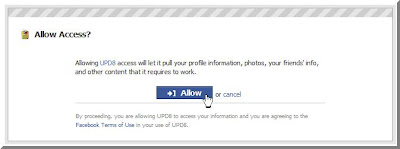

3. UPD8 will ask you ro register a specific Globe mobile number. Key in your number and click Register:

4. Confirm the registration by clicking on OK in the window that pops up:
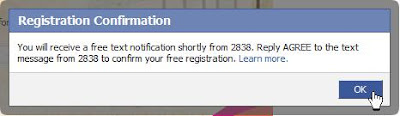
5. You'll receive a confirmation text message from 2838 that says, "Welcome to UPD8! To confirm registration, reply AGREE for free." Simply reply to that message with the word "AGREE".

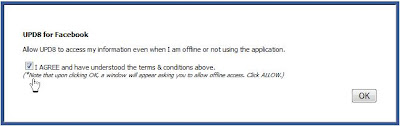
6. After you reply with the word "AGREE" to 2838, you'll get a confirmation text on your mobile and a confirmation message inside of FB. Click on the agree check box and hit the OK button:
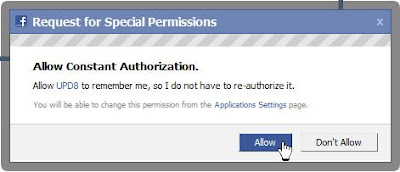
7. Another permission window will appear. Just click Allow to give FB permission to use the app:

8. After that you'll be directed to the main UPD8 app menus and they look like this:
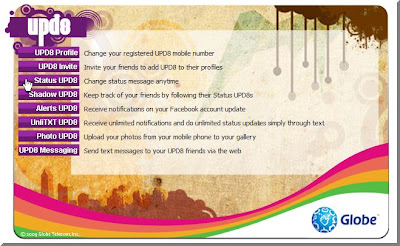

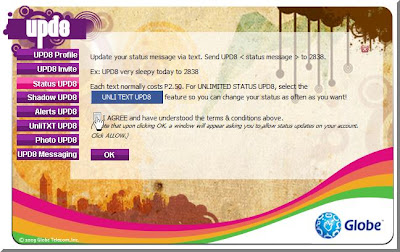
9. Since you're new and signing up, if you click on Status Updates it will show an agreement. You will have to click on the Agree check box to accept to the 2.50 per update charge. This will allow you to use the service. After that click on OK:
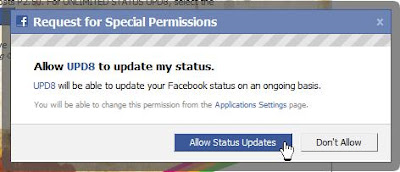
10. Another permissions window appears to allow the app to do status updates for you (just hit okay in the succeeding window):
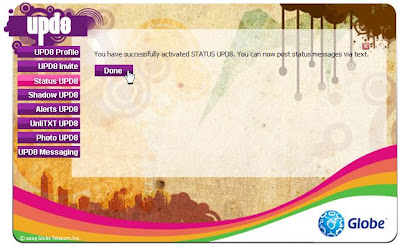
11. A confirmation that the process has been complete will appear in the main UPD8 page:

Now all you need to do is to send a message to 2838 using the syntax UPD8 *status*. Each update will cost you 2.50, although heavy users can go unlimited for 15 pesos a day. You can activate that by sending UNLI15 to 2838. If you're really, really must update it everyday and you update your status every hour, I'd recommend going unlimited for 5 days. That'll cost you 50 pesos, though if you push a lot of update it'd be worth it. Send UNLI50 to 2838 to get unlimited FB status updates for 5 days.

I must say that UPD8 has more features than PixMe does. I'm anxious to try all of them out, but that'll have to wait until i can get a proper phone for my second SIM.

HowTo: Update Facebook Status via SMS (cheap)

Saturday, May 9, 2009

1 comments
If you're a Facebook user and you'd like to update your status from your mobile, the usual way to go about it would be to confirm your number with Facebook and send pics and updates through MMS. Now if you're an avid FB user and you're in the Philippines the cost would snowball in a matter of days. I found a way to send updates and pictures to Facebook for 1 peso per update, though you'd have to be a Smart subscriber to do this. You can use a Facebook app called PixMe! Here's a quick guide on how to start using it:

1. Log in to your FB account, search for PixMe! then from this page click Go to the Application:

2. Click on Register in this screen to start the validation process:

3. You'll be asked to enter your Smart mobile number. Key in your phone number and click Register:


3. A window will pop-up to ask for permission. Click on Allow to authorize the PixMe app (click OK on the succeeding window that pops up):

4. You'll receive an SMS with this message:"Facebook notification msg: To validate ur cellnumber, txt FBVAL 123abc to 2330. If u r not XXnameXX, ignore this msg. This msg is free", where 123abc is the validation code and XXnameXX is your FB username.

5. Send a reply, following the syntax and the validation code in the message.

6. You will receive a confirmation message that the validation was successful.

7. Go back to the last PixMe! page you landed on after step 3 and click on the link to allow status updates:

8. You'll be asked to give permission again (click OK on the succeeding window):

9. You can now update your FB status by sending a messages to 2330. Use this command: FBSTATUS XXmessageXX (where XXmessageXX is the text of the status update you want to send). Each message is charged P1.00 .

There you have it. Enjoy updating your FB on the go.


UPDATE: Uploaded bigger versions of the screenshots to make them easier to recognize. Hope it helps

HowTo Twitter

Sunday, March 30, 2008

0 comments
There are a lot of guides out there. I am publishing this so I can point friends to some site on the web they can check to follow the steps.

First step is to sign up for a Twitter account. There's a good guide over at this blog : The Cyberprince Chronicles. It contains screenshots to boot. The thing you really need to set-up is the device updates. You only need to send an SMS to the UK number once. It will send you SMS updates free-ever-after if your Twitter preferences are set right.

Now the boon of Twitter wouldn't be the same without the ability to send updates from your mobile phone. But how to do that without breaking the bank? Sending SMS to the UK number will set you back 10-15 pesos per, depending on your cell subscription. You can send updates through to a local number accessible through the Globe or Sun networks. You can find instructions on how to use that gateway here: Pinoy Twittters.

Well what about Smart users, you say? Fear not, your kababayans have you covered. Go over to The Pinoy Twitters SMS Portal, register to participate in the forums and follow the instructions on how you can send to a local number that posts to Twitter. It only costs a peso, but if your a heavy-duty Twitter I'd suggest using something like the ALLTxtPlus for trigger-happy texting. I personally use phTwitters sparingly so it doesn't get overloaded. It's something that the maintainers are spending money on and are providing for free to the Twittering public. One way to run it to the ground would be to Twitter every 3 minutes about how boring your commute is. Never do that.

Once you're done, follow me :-) My page is at http://www.twitter.com/daysleeper_ed. Happy Twittering :-D

I'm Done

Wednesday, March 26, 2008

0 comments


So, how do you like the design? I personally think it looks better, with the 3-pane design and all. Place a comment to send in your thoughts and suggestions. :-)

Pardon The Dust

Tuesday, March 25, 2008

0 comments


Fixing up the site's design. Please excuse the dust :-)

All a-Twitter

0 comments


Just wanted everyone to know you'll find two new widgets on my sidebar, one for Twitter and one for Meebo. After months and months of hearing about Twitter over and over again, I relented and signed up for an account. Check out the widget or my page at www.twitter.com/daysleeper_ed. Add me, if you're Twittering as well. Meebo is just another way to chat with me. If you're here on my page, IM me from the Meebo widget :-)

Ads Are Welcome

Tuesday, March 11, 2008

0 comments
If you would like to place an ad on my blog, please leave your contact email in comments. My comments are moderated, so if you prefer that your email remain private it won't be published (please request for this).

I'm offering 125x125 space (that you see on my sidebar) and text links. Prices are extremely affordable.

Music Search

Thursday, January 3, 2008

0 comments
I've been busy with little projects at the office, mainly creating presentations for training people. The exposure is limited but at least its giving me a chance to gear up on my presentation skills. Crowds are typically small, 15-20 at a time. We have these small training sessions scheduled twice a month, which gives me ample time for research and preparing my material.

On my quest for better presentations that are less boring, I looked for sites that offered royalty-free music to use. One of the sites I found was Partners In Rhyme. To get a sampling of the kind of Royalty Free Music and Sound Effects they offer, click on the link. You can download the music and sound effects you need for your multimedia projects today, royalty-free at Partners In Rhyme.

Another site I found that had nice short tracks was Accelerated Ideas, get free tracks by clicking on the link.

Really Getting Into It...

Tuesday, November 6, 2007

0 comments
I'm too lazy to upload to Imageshack. It's been too long, I've forgotten my password and the email I registered. I'll post 'em here and link to 'em so I could use them as badges on my sidebar.


Tekzilla 5

Wednesday, October 31, 2007

0 comments
If I had the money and the wherewithal to stand Steve Jobs's arrogance, I'd get a Mac. I'd get Leopard. I'd get an iPhone, even. Alas, I do not have both! I'll settle for PCLOS Gnome and the fake Steve Jobs (he's funnier, anyway)...

Removed

Friday, April 6, 2007

0 comments
I'm not sure why but my blog was removed from Ubuntu-PH's planet. Hmmm? Maybe I've been classified persona-non-grata. Checked my mail and I didn't get any notice or anything. I haven't been checking planet for at least 2 weeks, as I go directly to the blogs of the people who's blog entries are posted there. I wonder how long it's been.

Added...

Thursday, March 15, 2007

0 comments
Add 2 new features on this blog, an RSS feed from Distrowatch.com and source code search from Koders.com. Both are on my blog's sidebar. Enjoy :-)

P.S.

Try out the source code search from this post (same interface is on the sidebar):


Updated My Blogchalk

Wednesday, March 7, 2007

0 comments
This is my new blogchalk:
Philippines, Pampanga, Angeles, Philippine, English, Ed,Male, 31-35, Ubuntu, Linux. :)

Tibuan, New Blog

Friday, February 23, 2007

0 comments
I just started this other blog to chronicle the adventures of a local band that I really like. They are called 'Tibuan' (the Kapampangan word for 'origin' or 'roots'). Please check the blog out at tibuan.blogspot.com and come back every now and then for gig updates and pics. Link to it too if you like what you see. :-)

Wordpress?

Friday, November 3, 2006

0 comments
I've been considering moving over this blog to Wordpress. It seems a lot more sophisticated and flexible than what I currently use in Blogger. And its an itch I need to scratch. I'm curious about Wordpress and I just want to try it.

I'm worried though that I might loose my archived content when I move my blog over there. Wordpress' "Importing" FAQ does assuage my worries, but one can never tell what unfortunate things might happen when experimenting.

On a lighter note, I've installed Edgy now and I'm currently updating. I couldn't download the ISO for Ubuntu as the servers were busy at the time I started to download. I checked on the servers hosting Edubuntu and I saw that the speed was better, even though there were only 2 mirrors in close proximity to the Philippines. I ended up downloading that and installed it today. No worries, though. I actually like Edubuntu's defaults. Next on my list, getting everything up-to-date, including my plugins :-)
Free Ground Shipping on Orders $125 or more at EpsonStore
Stop PC Crashes with WinZip System Utilities

Copyright © 2011 Tech Throes | Splashy Free Blogger Templates with Background Images, Trucks